Replacing WordPress in 2027

As of November 2026. Both projects move fast. The version facts below are illustrations, the architecture arguments are the point.
According to W3Techs, WordPress powers 39.4% of all websites and 58.1% of those that use a Content Management System (CMS). In April the same tracker had it at 42.5%. Three points in seven months is not a collapse, and W3Techs only counts the top ten million ranked sites, but it is a trend, and I hear it every month in the same conversation: the site is slow, a plugin broke the checkout, the agency that built it disappeared, and the security scanner lit up like a Christmas tree. "We want out. What do we move to?"
For years my answer has been Wagtail. Since April 2026 there is a new candidate: EmDash, the CMS Cloudflare built in TypeScript and presents as the "spiritual successor to WordPress". It is a serious piece of engineering and it deserves a serious look.
This article is not a feature checklist. It is the comparison I do before signing off on a migration, and it answers three questions in order: what are you actually buying, what will it cost you over five years, and what does the move really involve.
The short version
- Leave WordPress for control, not features. Its risks are the plugin model and the governance, not the editor.
- Pick Wagtail when content has to last for years, when the content model should be reviewed and versioned like code, when you have rules about where data lives, or when your team speaks Python.
- Pick EmDash when you are already on Cloudflare with a TypeScript team, your content is campaign- or event-shaped, near-zero hosting matters, and you can live with a 0.x product.
- The cost is people, not hosting. Over five years the hosting gap between the two is a few thousand dollars. Migration and maintenance are measured in developer-weeks.
- Governance decides it. Wagtail's roadmap belongs to a core team spread across several companies, on top of Django and Python, each run by its own non-profit foundation. EmDash, its framework and its platform all belong to Cloudflare.
Where WordPress sits on the map
Before comparing anything, draw the map, because most bad CMS decisions come from comparing products from different families as if they were the same thing.
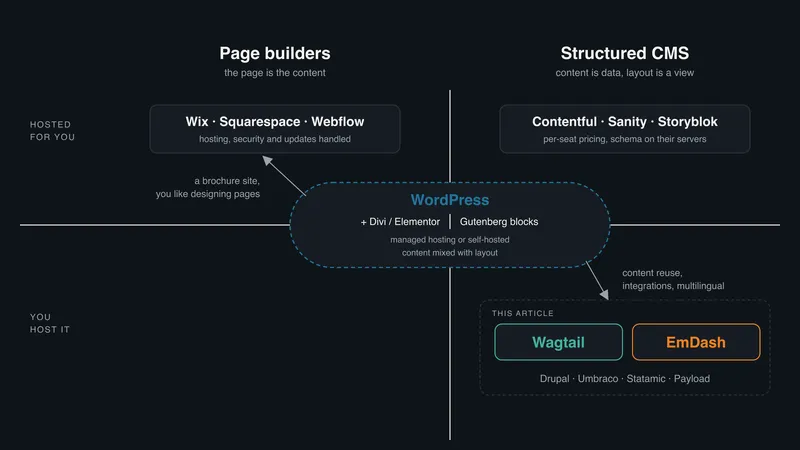
The market sorts CMSs two ways. By who runs it: open source you host, proprietary you licence, SaaS you rent. And by architecture: traditional, where the CMS renders the pages itself, headless, where it only serves content through an API, and hybrid, which does both. Those labels tell you who you pay and where the front-end lives. They say nothing about the question that decides whether your editors will be happy in year three and whether your content survives the next redesign: how content is authored.
On that axis there are two families. Page builders (Wix, Squarespace, Webflow, and WordPress with Divi or Elementor) let you design the page while you write it. The page is the content. This is a Word document: you put things where you want them, what you see is what you get, until you need the same thing in a different layout and discover there is no "thing", only a layout. Structured CMSs (Wagtail, EmDash, Umbraco, Drupal, Statamic, the headless products) make a developer define what a page is: a title, an intro, a list of blocks, an author, a date. An editor fills in the fields and the design is applied afterwards. This is a database with a stylesheet. Content is data, layout is a view on it, and you can change the view for every page at once without touching one of them. Karen McGrane called the two sides blobs and chunks. Harder on day one, easier in year three, and the only way content survives a redesign, a second channel or an AI agent asking for it.
By the market's labels WordPress is a traditional, open-source, self-hosted CMS, and the press files it next to Drupal rather than next to Wix. By the axis that matters it is a blog engine from 2003 with a page builder bolted on top and an app store bolted on the side. It promises both families and delivers both badly, with content stored inside its layout (HTML blocks, shortcodes or a builder's JSON) that neither a designer nor a machine can safely reuse.
So here is the honest answer to a question I get often: why would a Divi user move to Wagtail rather than Wix? Often they shouldn't. If you run a brochure site and you like designing pages in the browser, a hosted builder does what WordPress-plus-Divi does, with hosting, security and updates handled by someone whose business depends on it. Go there and don't look back. The reader of this article is the one who has outgrown that: content reused across pages or channels, integrations, multilingual, rules about where data lives, a site that is part of the business rather than a brochure for it. Whether that reader is one editor or twenty, they need structure, and the rest of this article is for them.
The reasons to leave WordPress
Let's be fair to WordPress: it won its market share because anyone can install it, find a theme and bolt on a plugin for anything. But today this is also exactly why people leave.
- Plugins share everything. A plugin runs in the same PHP process as the core with full access to the database and filesystem. Cloudflare says 96% of WordPress security issues come from plugins. Patchstack's 2025 data says 91% of new vulnerabilities. The number varies, the conclusion does not.
- Content is HTML soup. Gutenberg stores blocks as HTML with comment markers. The moment you want that content somewhere else (an app, an API, a second site, an LLM), you are parsing HTML.
- The business model is the plugin stack. Caching, SEO, forms, security, backup: five dependencies with five release cycles, five licences and five attack surfaces before you have written a line of content.
- The admin is a billboard. Every plugin bolts on a menu, a settings screen and a banner begging for an upgrade or a five-star review. Your editors work inside a dozen vendors' sales funnels, and the one security warning that mattered is buried under the ads.
As a rule of thumb, the problems people blame on WordPress are problems with an unmaintained plugin stack. A well-maintained WordPress site is fine, technically. The trouble is that "well-maintained" is the exception, and the architecture does nothing to help you.
The fifth reason is not technical
In September 2024 the WordPress project's founder, Matt Mullenweg, picked a fight with WP Engine, one of the largest WordPress hosts, over trademark licensing fees. Within weeks wordpress.org had cut WP Engine's servers off from plugin and security updates, and replaced Advanced Custom Fields, a plugin running on millions of sites, with an Automattic fork under the same name, so sites changed plugin owners on their next update whether their administrators wanted to or not. It took a federal preliminary injunction, in December 2024, to restore access.
None of those sites had done anything wrong. They were maintained, on a reputable host, and they lost their update channel because of a dispute between two companies they had no say in. The aftermath is still being felt: WordPress slowed to one major release a year in 2025, citing "resources being diverted due to ongoing legal matters", Automattic's own board briefly placed Mullenweg on leave in September 2026, and the court has let WP Engine's monopolisation claims proceed. No trial date is set.
You can run a perfect plugin stack and still not control that risk. Rule of thumb: if the project's roadmap depends on the mood of one person, it is not your roadmap.
Where to go?
You have decided to leave. The right destination depends less on features than on who builds and maintains the site.
| Who builds the site | Go to | The catch |
|---|---|---|
| You, page by page, in the browser | Wix, Squarespace, Webflow | You rent the platform, and your content stays in its layouts |
| A writer with a blog or a newsletter | Ghost | Excellent at one thing, and only that thing |
| Developers writing docs in Markdown | Astro, static | No editing in the browser, no editorial workflow |
| A .NET team | Umbraco | None worth naming. It is the right answer there |
| A PHP or Laravel team | Statamic or Craft | Solid and well maintained. The Pro editions are licensed per site |
| A PHP team at a large institution | Drupal | Every major-version upgrade is a project in its own right |
| An enterprise buying a marketing suite (personalisation, DAM, analytics, campaigns) | Adobe Experience Manager, Sitecore, Optimizely | Licences in six figures a year, and you are buying a suite, not a CMS |
| A front-end team that rents its back end | Contentful, Sanity, Storyblok | Per-seat pricing, and your content lives on their servers |
| A TypeScript team building an app first, a site second | Payload | Good product, smaller community |
| A TypeScript team already on Cloudflare | EmDash | 0.x, almost no plugins, sandboxing only on Cloudflare, content types defined in the database |
| A Python or Django team | Wagtail | No themes: you build the front-end yourself |
The last two rows are the ones this article compares.
The enterprise suites are not where people leaving WordPress usually land, but the line is thinner than the price tags suggest. Many organisations on AEM or Sitecore use a fraction of the suite and pay for all of it. Wagtail already runs content for NASA, the NHS and Google, and at that scale the usual pattern is a composable stack: Wagtail as the content hub, next to dedicated search, analytics or personalisation services. Whether it can replace a full suite is a different question, with a different answer, and the subject of another article.
What you are buying
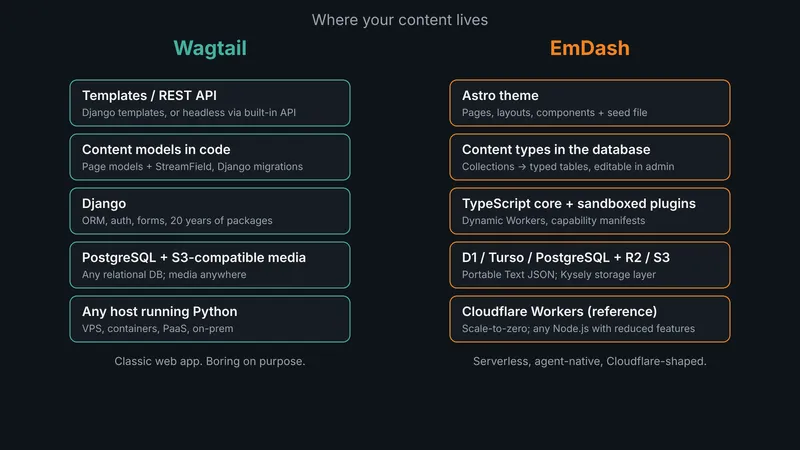
In one sentence each: Wagtail is a mature open-source CMS whose content structure lives in your code, and EmDash is a young CMS from Cloudflare whose content structure lives in its database and which runs best on Cloudflare's network. The detail follows.
Wagtail is a CMS built on Django, created by Torchbox in 2014 and used, among others, by NASA, Google, Mozilla, the NHS, MIT, Oxfam. BSD licence, 1000+ contributors, a public roadmap, an LTS release every twelve months (currently 7.4, with 8.1 the latest release). Your content model is a Django model: typed fields, StreamField for flexible block layouts, every revision versioned. The schema lives in your repository and changes through a pull request and a migration, like any other code. An editor cannot "just add a field" from the admin, which is a feature the moment more than one person touches the site. Everything Django offers (ORM, auth, forms, twenty years of packages) is available next to your content. You host it wherever Python runs.
EmDash is a CMS written in TypeScript on top of Astro, which Cloudflare acquired in January 2026. It was announced on April 1, 2026 as a v0.1.0 developer preview, built in about two months by Matt Kane of the Astro core team with heavy use of AI coding agents and, they insist, no WordPress code. MIT licence. Content is structured JSON (Portable Text), a huge step up from WordPress, but the content types live in the database, not in code: a theme's seed file defines the initial collections and an administrator can then create and modify types from the admin UI. That is closer to Contentful than to Django: fast to prototype, no deploy to add a field, and no schema in version control unless you build that discipline yourself. Each plugin runs in an isolated sandbox with declared capabilities, every instance ships an MCP server for AI agents, and it is designed for Cloudflare Workers with D1 and R2, though it also runs on any Node.js server.
Different decade, different philosophy, same target.
Plugins and the blast radius
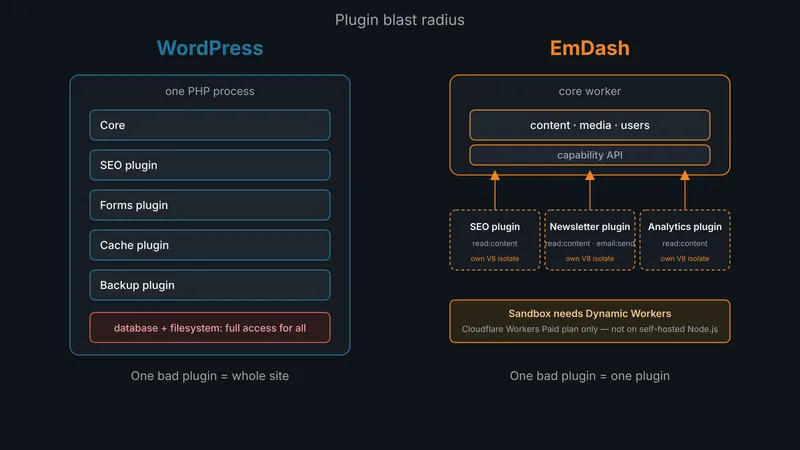
Cloudflare's main pitch is security by isolation, and it is a good pitch. Each EmDash plugin runs in its own V8 isolate (a "Dynamic Worker") and declares what it needs in a manifest: read:content, email:send, and so on. A compromised newsletter plugin cannot read your users table because it never had the capability. This is the OAuth-scopes model applied to a CMS and it is how plugins should have worked all along.
Two caveats the launch post does not put in the headline:
- The sandbox only exists on Cloudflare. Dynamic Workers require the Workers Paid plan (from $5 USD/month). Self-hosting on Node.js currently gives you no sandboxed plugins at all. Matt Mullenweg's jab that plugin security "only works on Cloudflare" is, today, simply true.
- There are almost no plugins. The emdashcms.org marketplace exists and plugins are audited automatically with Workers AI. Adoption is minimal, there is no page builder and no commerce layer. WordPress has 60,000+ plugins and 14,000 themes. That gap does not close because the architecture is better.
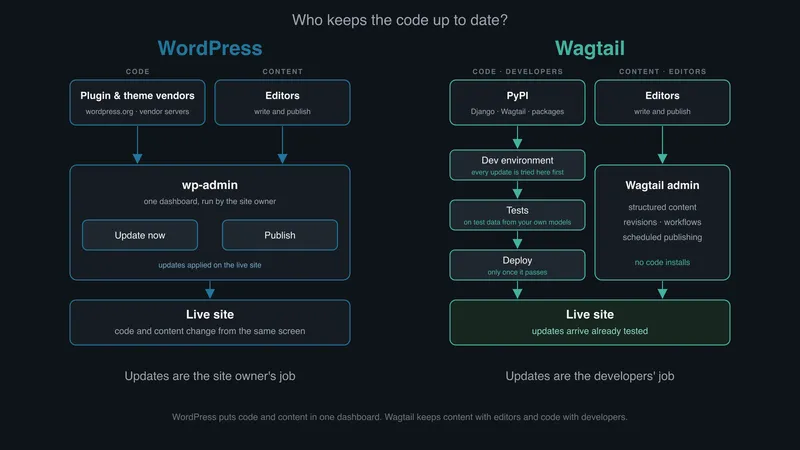
Wagtail takes the opposite stance: there are no "plugins", there are Python packages. They run in-process with full access, exactly like a WordPress plugin. The difference is procedural, not architectural: you install far fewer of them because Django already does most things and you review them like any dependency. Wagtail itself has a published security policy, ships Common Vulnerabilities and Exposures (CVE) fixes promptly and has an independent security audit on its roadmap.
You can test WordPress updates on a staging site too, and good agencies do. But a WordPress site's structure lives in its database: plugins keep their settings, custom fields and layouts as rows next to your content. To test an update you need a fresh copy of production, personal data included, every time. On Wagtail the content model is code. Every page type and field is defined in the repository, so a developer can generate realistic test data from those models and try the update without ever touching production data.
No platform makes you secure. EmDash gives you better defaults, on one vendor's platform. Wagtail gives you mature, boring ones, anywhere you want.
Hosting and the question of lock-in
In short: Wagtail runs anywhere and is always on. EmDash runs cheapest on Cloudflare and costs almost nothing when nobody visits.
Wagtail is a classic web application: Python process, PostgreSQL (please), S3-compatible media, a cache. VPS with gunicorn, containers, PaaS, Azure App Service, on-prem: nothing about it cares who your provider is. There is no scale-to-zero. Since 8.0 there is a credible hybrid: run Wagtail purely as an API and put a JavaScript front-end at the edge. The official bakerydemo-headless (5 November 2026) does exactly that with Next.js, reaching feature parity with the classic demo through the v3 API alone, with TypeScript types generated from the OpenAPI schema and live preview rendering the Next.js view. Note that the v3 API is still labelled a preview, so call it an official demo, not yet a production pattern.
EmDash is "designed for Cloudflare Workers" and that is not a marketing phrase. The reference stack is Workers + D1 (SQLite) + R2 + KV for caching, which is beautifully cheap: Cloudflare's own blog runs on it, at around 75 requests per second on a normal day, with spikes above 5,000, load-tested to 7,000, and p95 response times that stay flat. You scale to zero when idle and pay for CPU time.
But look at that migration closely: Cloudflare did not use D1. They used Hyperdrive to reach a PlanetScale database, because SQLite-at-the-edge suits a blog and suits anything relational less well. The storage layer (Kysely) also supports Turso and PostgreSQL, so you are not stuck, but every step off the reference stack is a step you take alone, without documentation written for you.
EmDash is technically portable and practically Cloudflare-shaped. If you are already on Cloudflare and happy there, that is a non-issue. If your client has a policy about where data lives (hello, Quebec public sector and financial services), it is a conversation for day one.
Who holds the keys
Governance deserves the same scrutiny we just gave WordPress, and here the two candidates differ. EmDash is, today, a project of one corporation whose business is selling Workers, with no published governance model and no committers from outside Cloudflare yet. The MIT licence protects the code, not the roadmap. Wagtail has a public six-month roadmap, a core team spread across several companies, an LTS commitment, a package maintainers' guide and a BSD licence. Torchbox created it and sponsors it, but it cannot cut anyone off from a plugin directory, because there isn't one. After WordPress's 2024 debacle, that is not an abstract distinction.
The layers underneath matter as much as the CMS. Wagtail sits on Django and Python, and each has its own independent governance. Python is run by the Python Software Foundation and a steering council elected by its core developers. Django is run by the Django Software Foundation, a non-profit that pays Fellows to triage bugs and ship security releases, with its own elected steering council. If Torchbox disappeared tomorrow, Django and Python would not notice, and the Wagtail core team already includes people from several other companies. Around them is a community two decades deep: DjangoCons on several continents, Wagtail Space events, and a hiring pool that does not depend on one vendor. EmDash's stack is the opposite. The CMS, Astro (the framework under it) and Workers (the platform it is designed for) all belong to Cloudflare. That is efficient while one company's interests match yours, and a single point of failure when they stop matching.
To be fair to Cloudflare, the risk is not the WordPress one. A public company that wants developers on its platform has every reason not to hold their sites hostage. The realistic risk is the ordinary one for a corporate open-source project: priorities shift, the team moves on, and the community outside the company is not yet large enough to carry it.
AI and agents: still the differentiator?
In short: EmDash was built for AI agents from day one. Wagtail has caught up fast in the last three months, but its new pieces are still labelled previews.
This is where EmDash is new. Every instance ships an MCP server, a CLI and "Agent Skills": documentation that teaches a coding agent to modify the installation, convert a WordPress theme, write a plugin. Your CMS is a first-class citizen for an agent, not something it scrapes. Add x402 micropayments and you can, in theory, charge agents per request. Joost de Valk (Yoast) calls it "the most interesting thing in content management in years", and if you believe the next five years of web traffic include a lot of agents, that is a strategic bet.
Wagtail's answer arrived in a three-month burst. 8.0 (August) introduced a v3 REST API on Django Ninja with authenticated writes (create, edit, publish, revert) and generated OpenAPI 3.1 schemas. Official agent skills for Wagtail developers followed in October. 8.1 (2 November) added workflow operations through the API, StreamField block schemas, a prototype wagtail CLI that connects agents to a live site, and the ability for one URL to serve HTML, JSON or Markdown depending on the Accept header. The headless demo landed three days later. Read the project's blog from October and November and it is almost entirely about agents, API and AI developer experience. Whatever "additive" meant in April, it does not describe this.
Two differences remain. The v3 API is a preview and the CLI "may still have some rough edges", in the core team's words. And Wagtail has no MCP server in core, where EmDash ships one per instance. EmDash was designed around agents from day one. Wagtail is retrofitting the same idea onto a twelve-year-old codebase, carefully, with deprecation warnings. One costs you maturity, the other costs you migration.
Rule of thumb: if "agents will consume my content" is in the business plan, both are credible and EmDash is still worth a prototype. If it is in the slide deck but not in the budget, it is not a reason to pick a CMS.
What Wagtail makes you pay for
Before the verdict, the part a Wagtail specialist should say out loud, and say accurately.
Wagtail ships more in the box than its reputation suggests: redirects (created automatically when a slug changes), forms, sitemaps, search, SEO title and description fields with length checks, editorial workflows, multilingual support, image renditions, an accessible admin. What it does not ship is a theme. There is no marketplace of front-ends to install on a Saturday afternoon. You build the templates, or a JavaScript front-end over the API, and you own them. For a site owner used to buying a theme for $59, that is the cultural shift, and it is a cost measured in developer-days before the first page renders. Search is the other honest gap: the database backend is fine for a few thousand pages, and beyond that you run Elasticsearch or OpenSearch, which is one more thing to operate.
Upgrades are planned work, not a stream of surprises. A Wagtail LTS arrives every twelve months and pairs with a Django LTS. Django 5.2, which Wagtail 7.4 requires, is supported until April 2028. A client on an LTS pair can sit still for a year and receive only security fixes, and the yearly upgrade is typically a few developer-days with a decent test suite. When Wagtail drops a version it is following upstream end-of-life (Django 4.2 left extended support in April 2026, Python 3.10 in October 2026), and deprecations come with a runway: the v2 API, superseded by v3, keeps working through the 8.x series with warnings before removal in 9.0. This is one coordinated dependency tree with a documented path, not twenty plugins from twenty vendors. The cost is a line in the yearly budget. The failure mode is the client who skips two LTS cycles and turns a few days into a few weeks.
The admin is a structured-content editor, not a page builder. Editors get typed fields, StreamField blocks and a live preview. They do not get drag-a-hero-here. Some editors prefer this after a week, some never forgive you. Know which you have before you promise anything.
Hiring is Django hiring, which is easy. The Wagtail specifics take a Django developer a couple of weeks, less than a WordPress developer needs to work out what a theme's functions.php is doing. And there is no serverless story for the Python half: something is always running, even at 3 a.m. with zero visitors. At $20 a month that is a line item rather than an argument, but it is a difference, and EmDash's scale-to-zero is a real one.
What it costs over five years
These ranges come from my own projects. Yours will differ, but the shape will not.
| Over five years | Wagtail | EmDash |
|---|---|---|
| Migration (one-off) | 2–4 weeks for a clean brochure site, 2–4 months for a content-heavy or multilingual one | The same, plus any plugins you write yourself |
| Hosting | $1,200–3,600 on a VPS, $6,000–18,000 on a managed PaaS | $300–1,800 on Cloudflare |
| Maintenance | 10–25 developer-days, one LTS upgrade a year | Unknown until v1, with breaking changes to absorb |
| People | Django developers, a large pool | TypeScript and Cloudflare developers, nobody with a year of EmDash in production |
Read the table from the bottom up. Hosting is the smallest number on it: a single developer-week costs more than five years of a VPS. The decision is in the people and maintenance rows.
Hosting. A Wagtail site for a small or mid-size organisation runs comfortably on a $20–60 USD/month VPS with PostgreSQL and object storage, or $100–300/month on a managed PaaS if you do not want to operate anything. Add a front-end host if you go headless. EmDash on Cloudflare starts at $5/month for Workers Paid plus usage. The D1 and R2 free tiers cover most content sites, and a busy one rarely passes $30/month. On pure hosting, EmDash is two to four times cheaper than a VPS and up to ten times cheaper than a managed PaaS at the low end, and the gap narrows as traffic grows.
Migration. A brochure or blog site with a clean content structure: two to four weeks for either target, dominated by front-end work. A content-heavy or multilingual site with custom post types, forms and a few years of editorial history: two to four months. A site whose business logic lives in plugins (membership, catalogue, booking, commerce): that is a rebuild, not a migration, and the CMS is the smaller half of it. On Wagtail that logic becomes Django code. On EmDash it becomes plugins you write yourself, today.
Maintenance. The yearly Wagtail LTS upgrade described above is two to five developer-days with a decent test suite, more if the previous team skipped a cycle. Security releases in between are usually a version bump. EmDash is at 0.x, so the honest number is "unknown, and expect breaking changes until v1": a 0.x upgrade may be a day, or may be a week.
People. Wagtail is a Django hire, from a large pool. EmDash is a TypeScript and Cloudflare hire with, as of today, nobody who has run it in production for a year. The five-year question is mostly this line.
What a migration really involves
The import itself is no longer the hard part, and it is no longer a job for a package. Wagtail has wagtail-wordpress-import and EmDash a WXR wizard that converts 30+ Gutenberg block types. Both do a decent first pass on plain Gutenberg content, and both stall on what makes your site yours: shortcodes, custom fields with cryptic keys, page-builder markup. An AI agent does that mapping better. Give it the WordPress export and your new content model, and it turns each post into typed fields and blocks, lists what it could not place, and runs again when you change the model. Review its output like any other migration script. Themes and plugins are rewritten in both cases. Anyone who tells you otherwise has not done one. Here is where the time goes.
The content model. WordPress let the previous agency store anything anywhere: custom fields with cryptic keys, shortcodes inside post bodies, a taxonomy nobody remembers creating. The first week is archaeology. You decide what becomes a typed field, what becomes a block, and what gets dropped. This is the step that determines whether the new site is better or merely different.
URLs and redirects. Every slug that changes is a 301 you must write, and the ones you miss are the pages Google was sending traffic to. Export the URL inventory before you touch anything, crawl the old site, map it, and keep the redirect table under version control. Expect a visible SEO dip for four to eight weeks even when you get it right, and warn the client before, not after.
Media. Thousands of images with WordPress-generated size variants, hotlinked from body content, half of them orphaned. Decide early whether you migrate the originals and let the new CMS generate renditions (yes) or copy the variants (no).
Forms and the forgotten five. Every WordPress site has a contact form plugin, an analytics snippet, a cookie banner, a newsletter integration and one plugin nobody can explain. Each is a conversation with the client about whether the function survives and who owns it afterwards.
Editors. The people who used Gutenberg for six years will not love StreamField or TipTap on day one. Budget a half-day training session and a written guide, and plan two weeks of "can you just" questions. The migrations that fail are rarely technical. They are the ones where editors go back to the old site because nobody showed them the new one.
The cutover. Run both sites in parallel, freeze content on the old one for 48 hours, import, verify the redirect table, switch DNS, keep the old database for six months. Cloudflare's own EmDash migration used a proxy with a version cookie to move traffic from 1% to 100% in a day, with automatic fallback on errors. You can do the same with any reverse proxy, and you should.
So, which one?
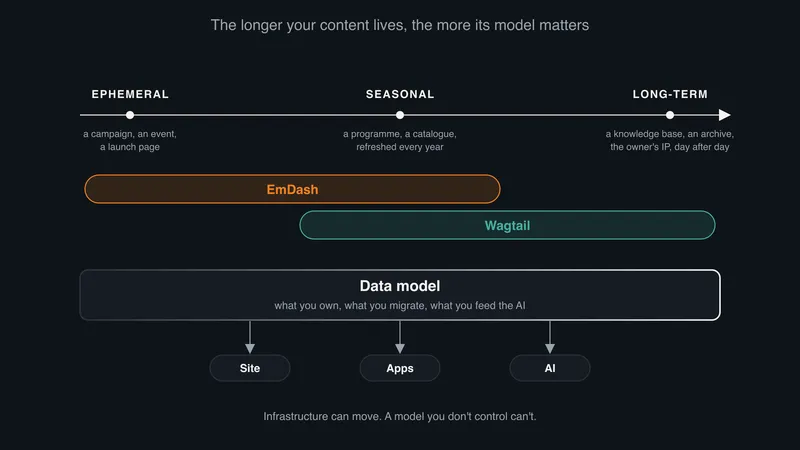
Strip away the stack and the choice is about your content: how long it has to live, and who controls what it means.
How long it lives. Some content is ephemeral: a campaign, an event page, a launch that is forgotten in three months. Some is seasonal: a programme or a catalogue rebuilt every year on the same skeleton. And some accumulates: the knowledge base, the archive, the case studies, the reference pages that grow a little every day and, after ten years, are the organisation's intellectual property. The further right you are on that line, the less the CMS matters and the more its data model does.
Who controls the model. That is the real currency. In Wagtail, an event has a date, a venue and a speaker because a developer wrote that down in code. The model is versioned in Git, changed through review, and readable by whoever inherits the site. In EmDash, an administrator can reshape a collection from the admin in a minute. That is freedom on day one and drift by year three, unless someone owns the model and keeps it out of the database's hands. Contentful shows a database-defined schema can last, but it pairs it with separate environments and scripted migrations. EmDash today offers an admin-only Content Types screen and a command that exports the schema to a file, and not much more.
What the AI gets. An AI is only as useful as what you feed it. A typed model (this is a speaker, this is a date, this page supersedes that one) gives an agent or a retrieval pipeline clean, trustworthy context. A pile of blocks gives it a guess. Both CMSs store structured content, and EmDash ships an MCP server to serve it. But the model you control, document and keep in Git is the one you can still feed to the next AI, and the one after that, long after this CMS has been replaced.
Where it lives comes last, because it can move. Wagtail runs wherever you choose. EmDash is happiest on Cloudflare. If you have rules about where data lives, settle that on day one. If not, it is a hosting bill.
People do not leave WordPress for features. They leave because they lost control: of the plugins running in their database, of the update channel, of a roadmap one person turned against them. The replacement has to hand that control back.
Wagtail does, on three counts. The model is code in your repository, reviewed like code. The platform is anywhere Python runs. The roadmap belongs to a core team spread across several companies, on a stack where no layer belongs to a single vendor, with no directory anyone can cut you off from. EmDash gives you the code, under MIT. But the model lives in a database an admin can reshape, the sandbox only works on Workers, and the roadmap belongs to one company that sells Workers. v1 will close the feature gap. It will not change who holds the keys.
That does not make EmDash the wrong choice everywhere. Pick it when:
- you are already on Cloudflare and your team writes TypeScript;
- the content is short-lived: campaigns, events, launches;
- near-zero hosting matters more than a five-year roadmap;
- agents consuming your content are in the budget, not just the slide deck;
- you can absorb breaking changes until v1.
If you are not leaving yet. Staying on WordPress does not hand anything back. Treat the site as something to decommission on a schedule, not a place to settle:
- Freeze the plugin count.
- Keep the content exportable.
- Set the exit date before the next incident sets it for you.
Leaving WordPress is a chance to own your site again. Wagtail is the option where you actually do.
If you are planning a WordPress exit and want a second opinion on the architecture, the migration path or the hosting, feel free to get in touch. I have done enough of these to know where the bodies are buried, and most of them are in the redirect table.